Online

Warzone Cheat

Run Call of Duty: Warzone on Battle.net, Steam, or the Xbox PC app from one Windows menu. Gun work, squad overlays, loot filters, and radar each sit on their own tab — read the build stamp on the cheats page before your first queue.

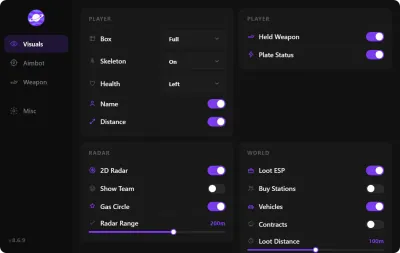
Call of Duty: Warzone cheat visuals tab with player boxes, distance tags, and team colors.

10 and 11

Windows

Required

Cloud DMA

7

Menu groups

On product pages

Checkout

Aimbot
Player ESP
Wallhack
Loot ESP
Radar
Soft aim
Recoil control
No-spread
Stream-proof
Cloud DMA
Config profiles
Combat mode
Windows 10 and 11
Call of Duty: Warzone
Battle.net, Steam, Xbox PC
Cloud DMA
TPM and Secure Boot
RICOCHET Anti-Cheat on PC
Config save and load
External loader
Aimbot
Player ESP
Wallhack
Loot ESP
Radar
Soft aim
Recoil control
No-spread
Stream-proof
Cloud DMA
Config profiles
Combat mode
Windows 10 and 11
Call of Duty: Warzone
Battle.net, Steam, Xbox PC
Cloud DMA
TPM and Secure Boot
RICOCHET Anti-Cheat on PC
Config save and load
External loader

Menu

Built for BR and Resurgence lobbies

Warzone Cheats groups gun work on the Aimbot tab, squad reads in one ESP column, loot filters for loadouts and plates, radar for rotations, and Misc for recoil helpers, stream capture, and saved configs.

Aimbot

Chest and upper-torso bias on moving targets.

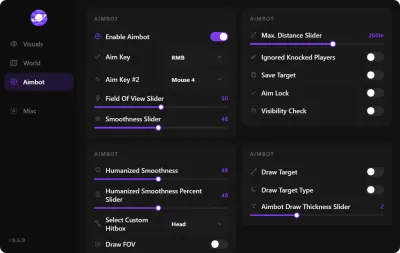
The Aimbot tab sets FOV, smoothness, speed, bone priority, visible checks, and downed-player ignores—the same fields listed on the product page. Tune bone priority when enemies run plate metas in BR or Resurgence.

  • FOV and smoothness
  • Bone and hitbox priority
  • Visible check
  • Ignore downed
  • Speed caps

Soft aim

Assist pull and target hand-off.

Soft aim and switch delay pair with the Aimbot tab. They limit how hard the correction pulls and how fast it moves to the next operator—listed on the product page as soft aim and switch delay.

  • Soft aim toggle
  • Switch delay
  • Works with FOV settings
  • Tuned per session
  • Misc placement

Player ESP

Squads on one overlay panel.

Player ESP and wallhack share one column set: boxes, skeletons, distance, weapon name, plate state, team index, and name tags. Snaplines and head markers use separate colors so you can tell teams apart in trios or quads.

  • Box and skeleton
  • Distance and weapon
  • Plate state
  • Team index
  • Snaplines and head markers

Loot ESP

Cash, plates, and crate gear.

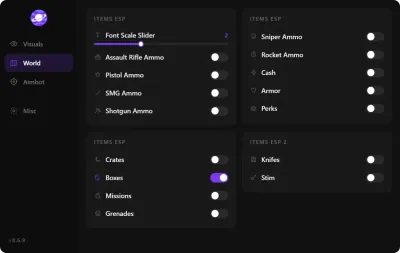
Loot ESP filters by item type, rarity, and distance so you can spot armor plates, cash, and ground loadout pieces between fights. Distance caps and minimum-rarity cutoffs match the toggles on the product page.

  • Item type filters
  • Rarity cutoff
  • Distance caps
  • Cash and plates
  • Ground loadout tags

Radar

Rotations without blocking your sights.

Radar includes the in-menu overlay and a web radar hook when the build supports it. Use it for nearby squad spacing on Urzikstan, Rebirth Island, or Resurgence maps without stacking more boxes on screen.

  • In-menu radar
  • Web radar hook
  • Separate from combat overlays
  • Opacity control
  • Optional with overlays off

Cloud DMA

Full menu needs the tunnel up.

Cloud DMA status is on Misc. The product page expects Cloud DMA connected on supported Windows 10 or 11 builds before the full module list is available for Warzone.

  • Misc tab status
  • Required for full menu
  • Windows 10 and 11
  • Cloud DMA product page
  • Check before checkout

Misc tab

Recoil help, stream hide, saved loadouts.

Combat mode turns world overlays off while aim helpers stay on. Stream-proof capture, save and load config profiles, menu key, panic key, and crosshair overlay sit with recoil control and no-spread helpers when those modules ship in your build.

  • Combat mode toggle
  • Stream-proof capture
  • Save and load profiles
  • Menu and panic keys
  • Recoil and no-spread

Store

Warzone Cheats

Compare the cheats and the utilities on this grid. Open a product page for the feature list and checkout options.

Warzone Cheats

Aimbot, player ESP, wallhack, loot ESP, soft aim, radar, recoil helpers, and Misc controls for Call of Duty: Warzone on PC.

A Windows menu with aimbot, player ESP, loot ESP, soft aim, radar, recoil and no-spread helpers, and stream-proof overlay. Cloud DMA has to be connected before the full set runs.

  • Aimbot
  • Player ESP
  • Loot ESP

HWID panel for Warzone PCs

Disk serials, MAC addresses, GPU IDs, and TPM rows get a new pass when RICOCHET Anti-Cheat flags this PC. A cleaner runs before the next sign-in.

After a hardware flag, this license rewrites disk serials, MAC addresses, GPU IDs, and related fingerprints RICOCHET Anti-Cheat may collect. Trace cleanup is in the same license.

  • Disk serial rewrite
  • MAC rewrite
  • GPU ID rewrite

Cloud DMA

Hyper-V on one Windows PC, with a guided install and encrypted activation.

Cloud DMA can also require GREENWARD, Static Server, and AWS, each bought on its own. Read that list on the Cloud DMA page before you order.

  • Single-PC setup
  • Guided Hyper-V installation
  • Encrypted activation

Warzone cosmetic preview

Weapon camos, operator skins, and blueprint visuals drawn on this PC for preview only — not unlocks on official servers.

A small client previews weapon camos, operator outfits, and blueprint looks on your screen. The look stays on this PC and is not written into your live inventory.

  • Weapon camo preview
  • Operator skin preview
  • Blueprint preview

Why these cheats

The Call of Duty: Warzone menu is written out before checkout

The product page names the same menu groups: combat tab, player ESP, loot reads, radar, Cloud DMA, and Misc. Checkout on that page shows the current access terms. A live label is not a promise against RICOCHET Anti-Cheat enforcement.

  • Build label before you queue

    Open the label on cheatswarzone.org after a Call of Duty: Warzone patch or a RICOCHET Anti-Cheat update. Yesterday’s build can already be out of date.

  • Combat and world on separate tabs

    Aimbot and soft aim sit on the combat side. One ESP column covers enemy operators; loot filters sit together for plate and loadout reads. Combat mode on Misc drops world overlays when you only want gun help.

  • Tickets with the order email

    Order and setup questions go through the support page. Include the order email, the Windows build, and whether RICOCHET Anti-Cheat is running on this PC.

  • One switch per option

    Every listed option has its own switch. After a patch, open combat, ESP, and misc to see which modules still run on your tier.

  • The same PC baseline as RICOCHET Anti-Cheat

    Windows 10 and 11 with TPM, Secure Boot, and Core Isolation left as RICOCHET Anti-Cheat already expects. The full module set needs Cloud DMA connected.

  • Hardware IDs are a separate license

    Changing hardware identifiers is its own utility. How many times a purchase can move machines is stated at checkout on the product page.

Win

Windows 10 and 11

Warzone Cheats is listed for 64-bit Windows 10 and Windows 11. Console, macOS, and Linux are outside that list.

DMA

Cloud DMA before the full set

Checkout states Cloud DMA is required before every module can run on a supported build. The misc tab shows whether that tunnel is up.

7

Menu groups

Combat tab, player ESP, loot ESP, radar, Cloud DMA, and Misc. Profiles save and load from Misc.

Setup guide

From the portal to your first Warzone lobby

The Warzone menu arrives through checkout on the product page. Download the loader, set a config profile, and open Call of Duty: Warzone on Battle.net, Steam, or the Xbox PC app only after the build label says the package is current.

  1. Download the Windows loader from the portal

  2. Turn on the modules you will use

  3. Match the build label, then open the client

How it works

From the build label to a saved profile.

Four steps from the live build label to a portal profile you can load before the next Warzone session.

4 easy steps

  1. 01

    Check the live build

    Open cheatswarzone.org and read the build label before you pay or start the client.

  2. 02

    Pick the matching product

    Take Warzone Cheats, or a utility when the problem is this PC, RICOCHET Anti-Cheat, or a license limit.

  3. 03

    Load the menu and set modules

    Download the loader from the portal, enable modules, and set aimbot and ESP layers before you queue.

  4. 04

    Store the profile

    Save the menu profile in the portal so the next session starts from those loadout settings.

Blog

Warzone cheats guides

Aimbot, ESP, Cloud DMA, skin tools, and RICOCHET Anti-Cheat troubleshooting for Call of Duty: Warzone on PC.

Explore Warzone cheats for PC, including aimbot, ESP, loot radar, wallhack and recoil tools, alongside current RICOCHET security changes.

Understand Warzone aimbot features, soft aim, targeting automation and how these differ from the game's legitimate aim-assistance settings.

Learn how Warzone ESP and wallhack differ, including character markers, skeleton displays and RICOCHET's server-side information protections.